





PRODUCTS

Industrial Gigabit 2 Light 8 Power Managed Parameters
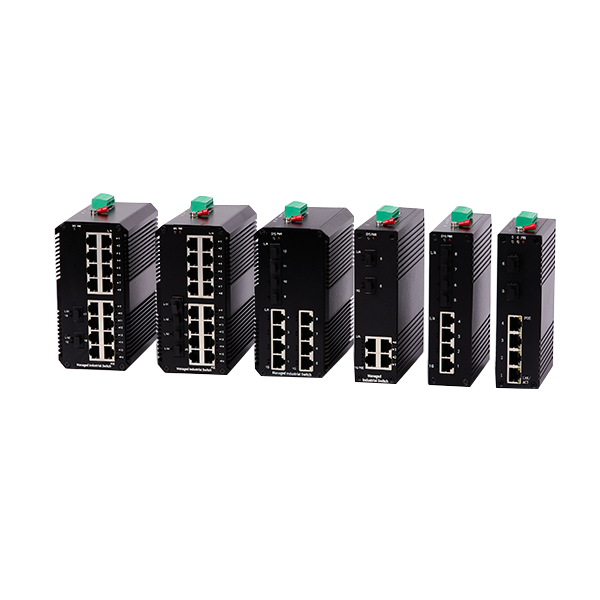
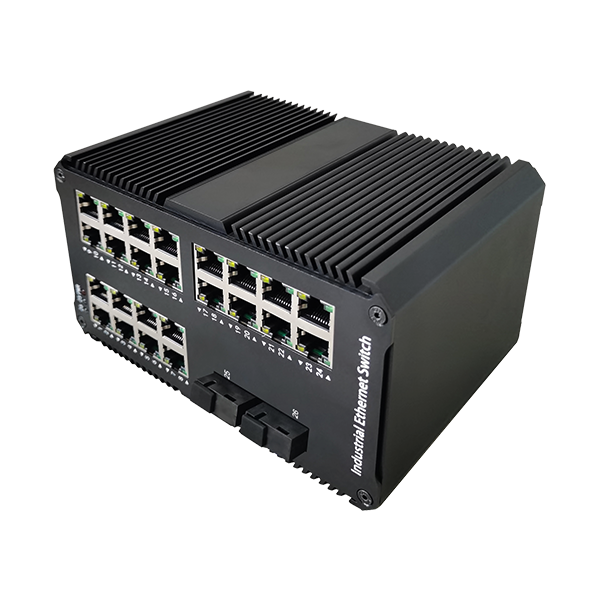
This device is a Web-managed industrial Ethernet switch, which is a self-developed industrial switch specifically designed for the industrial control field. It supports the international standard IEEE802.3D/W/S and complies with FCC, CE and ROHS standards. This series of switches supports rich and practical management methods such as port mirroring, VLAN, loop protection, QOS, system upgrade configuration, port aggregation, etc. This product is characterized by small size, fanless, low power consumption, high reliability, good stability, and easy maintenance.
Category:
E-mail:
Introduction
-
This device is a Web-managed industrial Ethernet switch, which is a self-developed industrial switch specifically designed for the industrial control field. It supports the international standard IEEE802.3D/W/S and complies with FCC, CE and ROHS standards. This series of switches supports rich and practical management methods such as port mirroring, VLAN, loop protection, QOS, system upgrade configuration, port aggregation, etc. This product is characterized by small size, fanless, low power consumption, high reliability, good stability, and easy maintenance.
Adopting mature technology and open network standards, the industrial Ethernet switch products are adaptable to low and high temperatures, resistant to electromagnetic interference, smoke, vibration and shaking, and equipped with redundant dual DC power supplies to provide redundancy mechanisms for critical equipment that needs to stay connected at all times. It can operate normally under the standard operating temperature range of -20°C to +70°C. The industrial switch supports DIN-35 rail mounting and has IP40 protection, making it the perfect choice for harsh environments. Widely used in intelligent transportation, industrial monitoring, mineral industry, electric power, water conservancy, oil field, infrastructure, ports, energy, farms and wireless coverage, etc., the switch is also suitable for many military and utility market applications and other environmental conditions that exceed the specifications of commercial products. Adopting mature technology and open network standards, Industrial Ethernet switches can adapt to low and high temperatures, resist electromagnetic interference, smoke, vibration and shaking, and are equipped with redundant dual DC power supplies to provide redundancy mechanisms for critical equipment that needs to remain connected at all times. It can operate normally under the standard operating temperature range of - 20°C to +70°C. The industrial switch supports DIN-35 rail mounting and has IP40 protection, making it the perfect choice for harsh environments. Widely used in avariety of data transmission applications such as intelligent transportation, industrial monitoring, mineral industry, power, water conservancy, oilfield, infrastructure, ports, energy, farms, and wireless coverage, it is also suitable for many military and utility market applications, and other environments that exceed the specifications of commercial products.
Features
-
Management Features
home
page:
Supports Logo, interface panel, and system information display (supports changing the logo, product model, and version number)
system:
Ip address settings, port settings, user accounts
PSE:
POE powered port control (PSE functionality only available for devices with POE power)
Configura tion:
VLAN 、QOS 、IGMP 、Link Aggregation, Loop Protection, RSTP, Port Mirroring, Port Isolation, Broadband Control, Jumbo Frames, MAC Binding, Green Ethernet, EEE, SNMP
safety:
MAC Addresses, broadcast storms
monitor:
Port statistics, cable diagnostics
tool:
Firmware upgrade, configuration backup, reset, save, reboot
Product Type :
Managed Gigabit Industrial DIN
-Rail Switches
MTBF:
100 ,000 Hours
Input Voltage:
DC 12V--60V
Working/storage temperature:
- 20℃ 一 +70℃
port
description:
4 * 10/100/1000M electric port+
8* 10/100/1000M fiber optics
Relative
Humidity:
5% 一 95%( no condensation)
Power
Consumption :
fully loaded< 8W
fiber optics
Singlemode/Multimode,
Singlemode: SC)
POE Power
supply:
Not included (additions supported)
RST reset:
Long press 7s to restore factory settings
indicator light :
PWR (power indicator) , LINK/ACT (link/data indicator) , POE (POE indicator)
Key
indicators
causality
Key
indicators
causality
Exchange method:
Store-and-forward
switching
capacity:
24Gbps
packet
forwarding ratio:
17.856Mpps
Mac
address table:
4k
polarity
reversal:
Support
flow
control:
Support
Network
Topology:
Supports ring topology, star topology, bus topology, tree topology, etc.
RSTP
switch:
Enable the RSTP switch for Rapid Spanning Tree Protocol (RSTP) to start.
network
standard:
IEEE802.3 ,IEEE802.3u ,IEEE802.3ab ,IEEE802.3x ,IEEE802.3az
Protection level:
IP40
Installation :
Standard DIN-35 guides
Product
Model:
ZSTX-IND9208W
Product Size:
143*92*40mm(L x W x H without protrusion)
weights:
0.7kg/unit
Package Size:
240*207*61mm
free-fall:
0.5m
Antistatic
interferen ce:
IEC 61000-4-2(8K/15K)
Port Surge
Protection:
IEC61000-4-
5(6KV/3KV)(10/700us voltage wave)
Power
Surge
Protection:
IEC61000-4-5(4KV/2KV)(1.2/50us , 8/20us combined wave)

-
Web page
1. The switch is powered on normally and any port is connected to the management PC.
2. The management PC has at least one of the following browsers installed: IE8.0 or above, the latest version of Chrome, 360 browser.
3. The IP address of the management PC is set to the same network segment as the switch port, i.e., 192.168.2.X (X is any integer between 2 and 253, the default IP address of this product is 192.168.2.254), and the subnet mask is 255.255.255.0.
4. In order to have a better experience of the web interface display, it is recommended to adjust the resolution of your monitor to 1280x800px or above.
5. Open a browser and enter the switch's default management address http://192.168.2.254 (you can modify the management IP address according to the customer's requirement) into the address bar to log in to the switch's Web management interface.
6. On the switch login page, enter the user name and password of the switch management account, the factory default value is admin.
7. After successful login, the home page of the web interface is displayed as shown below.

The left navigation bar, which is neutral software and does not show the Logo, the upper right is the model interface panel, and the lower right is the basic system information.
Product Applications

Parameters
-
Management Features
home
page:
Supports Logo, interface panel, and system information display (supports changing the logo, product model, and version number)
system:
Ip address settings, port settings, user accounts
PSE:
POE powered port control (PSE functionality only available for devices with POE power)
Configura tion:
VLAN 、QOS 、IGMP 、Link Aggregation, Loop Protection, RSTP, Port Mirroring, Port Isolation, Broadband Control, Jumbo Frames, MAC Binding, Green Ethernet, EEE, SNMP
safety:
MAC Addresses, broadcast storms
monitor:
Port statistics, cable diagnostics
tool:
Firmware upgrade, configuration backup, reset, save, reboot
Product Type :
Managed Gigabit Industrial DIN
-Rail Switches
MTBF:
100 ,000 Hours
Input Voltage:
DC 12V--60V
Working/storage temperature:
- 20℃ 一 +70℃
port
description:
4 * 10/100/1000M electric port+
8* 10/100/1000M fiber optics
Relative
Humidity:
5% 一 95%( no condensation)
Power
Consumption :
fully loaded< 8W
fiber optics
Singlemode/Multimode,
Singlemode: SC)
POE Power
supply:
Not included (additions supported)
RST reset:
Long press 7s to restore factory settings
indicator light :
PWR (power indicator) , LINK/ACT (link/data indicator) , POE (POE indicator)
Key
indicators
causality
Key
indicators
causality
Exchange method:
Store-and-forward
switching
capacity:
24Gbps
packet
forwarding ratio:
17.856Mpps
Mac
address table:
4k
polarity
reversal:
Support
flow
control:
Support
Network
Topology:
Supports ring topology, star topology, bus topology, tree topology, etc.
RSTP
switch:
Enable the RSTP switch for Rapid Spanning Tree Protocol (RSTP) to start.
network
standard:
IEEE802.3 ,IEEE802.3u ,IEEE802.3ab ,IEEE802.3x ,IEEE802.3az
Protection level:
IP40
Installation :
Standard DIN-35 guides
Product
Model:
ZSTX-IND9208W
Product Size:
143*92*40mm(L x W x H without protrusion)
weights:
0.7kg/unit
Package Size:
240*207*61mm
free-fall:
0.5m
Antistatic
interferen ce:
IEC 61000-4-2(8K/15K)
Port Surge
Protection:
IEC61000-4-
5(6KV/3KV)(10/700us voltage wave)
Power
Surge
Protection:
IEC61000-4-5(4KV/2KV)(1.2/50us , 8/20us combined wave)
-
Web page
1. The switch is powered on normally and any port is connected to the management PC.
2. The management PC has at least one of the following browsers installed: IE8.0 or above, the latest version of Chrome, 360 browser.
3. The IP address of the management PC is set to the same network segment as the switch port, i.e., 192.168.2.X (X is any integer between 2 and 253, the default IP address of this product is 192.168.2.254), and the subnet mask is 255.255.255.0.
4. In order to have a better experience of the web interface display, it is recommended to adjust the resolution of your monitor to 1280x800px or above.
5. Open a browser and enter the switch's default management address http://192.168.2.254 (you can modify the management IP address according to the customer's requirement) into the address bar to log in to the switch's Web management interface.
6. On the switch login page, enter the user name and password of the switch management account, the factory default value is admin.
7. After successful login, the home page of the web interface is displayed as shown below.
The left navigation bar, which is neutral software and does not show the Logo, the upper right is the model interface panel, and the lower right is the basic system information.
Product Applications
Keyword:
Applications

Corporations
Safety Precautions
Power Grids
Mineral Industry
Hydraulic Oil Field
Cybercafe Hotel
Elementary and Secondary Education
Community Apartments