




PRODUCTS
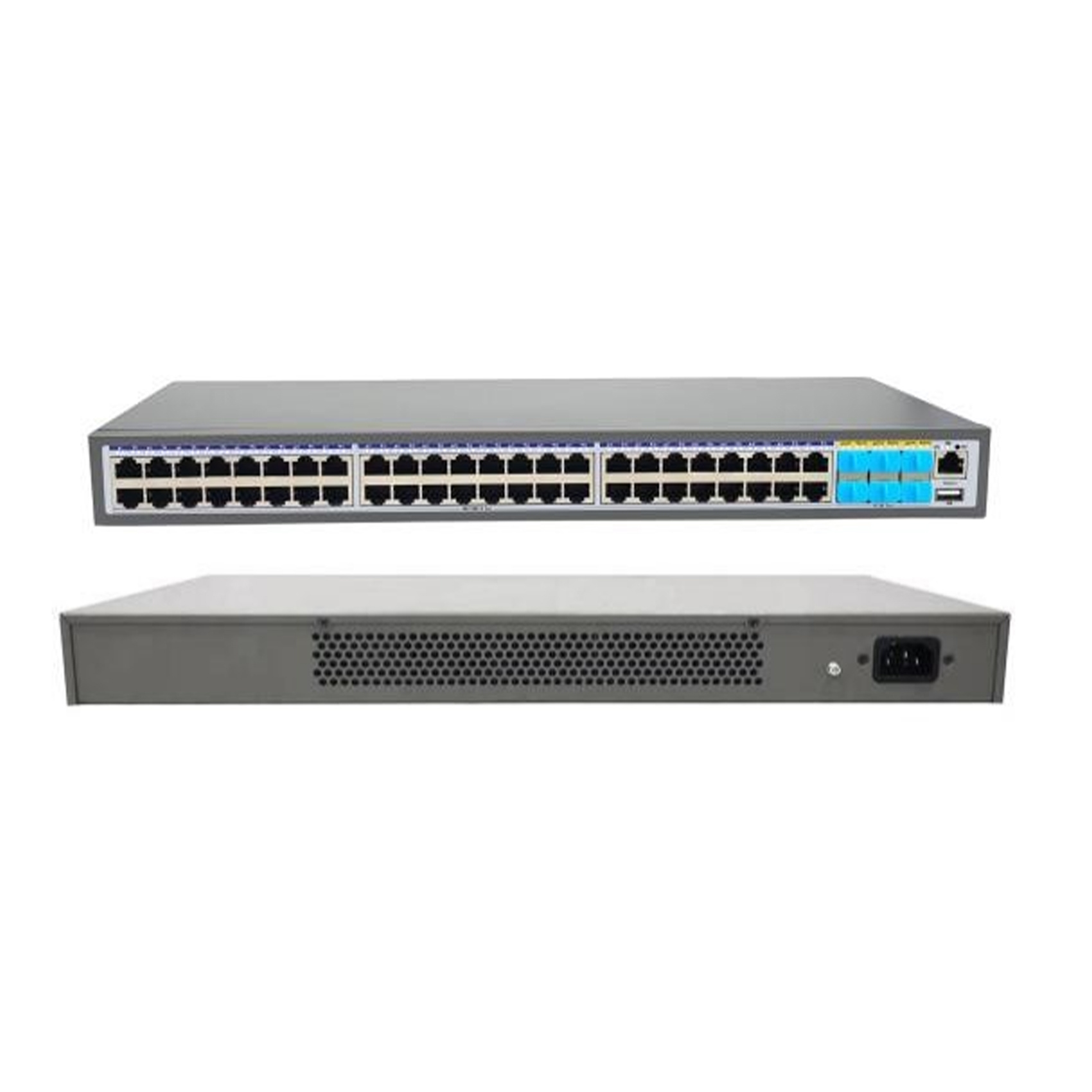
48+6 10 Gigabit Ethernet Layer-3 Management Switch
Category:
E-mail:
Introduction
-
Product Briefing
Layer 3 Managed Switch is a newly developed and launched cost-effective 10Gb/s uplink Layer 3 managed Ethernet switch, which adopts new generation of high-performance hardware, provides flexible Gigabit access ports and high-performance 10Gb/s uplink optical ports, and supports various business functions such as routing, multicast, VLAN, QOS, etc. It also has perfect security
control policy and network protection mechanism, and can be used as core/aggregation layer switch, which is ideal for various commercial network applications. It supports routing, multicast, VLAN, QOS and other service functions. With perfect security control and network protection mechanisms, it can be used as a core/aggregation layer switch, which is an ideal choice for various commercial network applications.
Perfect Layer 2 and Layer 3 multicast protocols, support IGMP V1/V2/V3, IGMP Snooping/MLD Snooping, to meet the needs of multi-terminal HD video surveillance and video conference access. It supports routing, DHCP Server, QOS, ACL control and other management functions, which can better meet the needs of families, enterprises, hotels and other networks.
Adopting store-and-forward mode, it automatically learns and updates the MAC address, which comprehensively improves the transmission and switching performance of the network. Can automatically adapt to the network environment, easy to install and debugging, high-quality metal shell, built-in high-power mute double ball fan, super cooling, greatly extend the service life.
Plug-and-play fast switching, all ports support wire-speed forwarding and MDI/MDIX auto-flip function.
This product is compatible with all mainstream cameras on the market, widely used in enterprise network core layer, convergence layer, and computers, printers, webcams, wireless AP compatibility, can be extended to the multimedia transmission system, wireless network transmission, industry broadband private network, etc.; and is suitable for enterprises, security, transportation, electric power grids, mineral industry, water conservancy and oil fields, small businesses, Internet cafes, hotels and schools, and other related data transmission fields. It can be used in a wide range of scenarios.
Features
-
Management Features
Homepage:
Support Logo, interface panel, system information display (support change LOGO, product model,
version number)
System:
System information, log information, port information, link aggregation, MAC address table
Network
Configuration:
DNS configuration, DNS host configuration, system time
Ports:
Port Configuration, Port Anomaly Protection, Link Aggregation, EEE Configuration, Jumbo Frame
Configuration, Port Security, Port Isolation, Storm Control
VLAN:
VLAN configuration, Voice VLAN, Protocol VLAN configuration, MAC VLAN configuration,
Surveillance VLAN, GVRP
MAC address
table:
Dynamic MAC address table, static MAC address table, MAC address filtering table, port security
MAC address table
Spanning Tree
Protocol:
Function settings, port settings, instance settings, instance port settings, message statistics
ERPS:
Functional Configuration, ERPS Example
Topology
Discovery:
LLDP
DHCP:
Feature configuration, address pool configuration, VLAN interface address group configuration,
client list, client static binding table
Multicast.
Basic Functions、IGMP Snooping、MLD Snooping、MVR
Routing:
IPv4 Management Interface, IPv6 Management Interface, Rip Route Management, Ospf Route
Management
Security:
RADIUS、TACACS+、AAA、Management channel configuration, authentication features, port
security, port isolation, storm control、DoS anti-attack, dynamic ARP inspection、DHCP Snooping、 IP Source Guard
ACL:
MACACL、MAC ACE、PV4 ACL、PV4 ACE、Pv6 ACL、PV6 ACE、ACL binding
QOS:
Basic Functions, Bandwidth Limiting
Loop Detection:
Loop Detection Configuration
Equipment
Logging function、 mirroring function、Ping、Traceroute、Electrical port testing、 optical module
Diagnostics:
information、 UDLD protocols
equipment
management
User configuration, firmware management, configuration management, SNMP configuration,
RMON configuration
Diagnostics:
information、 UDLD protocols
equipment
management
User configuration, firmware management, configuration management, SNMP configuration,
RMON configuration
-
Technical parameters
Product Type:
Layer 3 core management switch
MTBF:
100,000h
Voltage:
AC 110--240V
Working
temperature:
-10℃~+70℃
Port Description:
48×10/100/1000M RJ45 Ports
+6×10G optical port
+1×Console Ports
+1×USB 口
relative humidity:
5%~95%(non-condensing)
Whole machine power
consumption:
fully loaded<45W
indicator light:
Red (power indicator), blue (Gigabit link, rate indicator), orange (10G link
indicator)
Functional characteristics
Product Type:
Store-and-forward
switching capacity:
456Gbps
packet forwarding
ratio:
339.264Mpps
MAC Address
Table:
32K
forwarding delay:
<5us
polarity reversal
Support
flow control:
Support
RST:
Long press 7s system to restore factory settings
Console:
Network Device Configuration
Interface
USB:
Paired with console port, configure
switch usage
network standard
IEEE802.3,IEEE802.3ab,IEEE802.3x
network topology:
Support ring topology, star topology, bus topology, tree topology, etc.
Mechanical properties
protection class:
IP30
shell:
High-quality metal for superior heat dissipation
Product Model number:
ZSTX-IND92080WHC
power supply:
Power in12V 5A
Weight:
165.79ounces/unit
Product Size:
17.32*11.69*1.81inches(LxWxH)
Package Size:
19.69*14.76*3.86mm
Packing method:
portable
Mechanical dimensions

Note: Schematic diagram of the panel, subject to the real thing.
Packing List
Ethernet Switch:
1unit
Hanging ears:
1 set
power cable:
1root
Instruction manual,
certificate of conformity, warranty card:
1 each
Footrests:
a certain number or amount
8.Web Page
1.The switch is powered up normally and any port is connected to the management PC.
2.The management PC has at least one of the following browsers installed: Internet Explorer 8.0 or above, the latest version of Chrome, and 360 browser.
3.The IP address of the management PC has been set to the same network segment as the switch port, 192.168.2.X (X is any integer between 2 and 253, and the default IP of this product is 192.168.2.254) with a net mask of 255.255.255.0.
4.It is recommended that you adjust your monitor resolution to 1280x800 pixels or higher for a better experience of the web interface.
5.Open the browser, enter the default management address of the switch http://192.168.2.254 in the address bar (you can modify the management IP according to the customer's demand) to log in the Web management interface of the switch.
6.On the switch login page, enter the user name and password for the switch management account, the factory defaults are admin.
7.After successful login, the homepage of the web interface is displayed as follows:

The left navigation bar, this is neutral software, no logo is shown, the upper right is the model interface panel, the lower right is the basic system information.
Product Application

Parameters
-
Management Features
Homepage:
Support Logo, interface panel, system information display (support change LOGO, product model,
version number)
System:
System information, log information, port information, link aggregation, MAC address table
Network
Configuration:
DNS configuration, DNS host configuration, system time
Ports:
Port Configuration, Port Anomaly Protection, Link Aggregation, EEE Configuration, Jumbo Frame
Configuration, Port Security, Port Isolation, Storm Control
VLAN:
VLAN configuration, Voice VLAN, Protocol VLAN configuration, MAC VLAN configuration,
Surveillance VLAN, GVRP
MAC address
table:
Dynamic MAC address table, static MAC address table, MAC address filtering table, port security
MAC address table
Spanning Tree
Protocol:
Function settings, port settings, instance settings, instance port settings, message statistics
ERPS:
Functional Configuration, ERPS Example
Topology
Discovery:
LLDP
DHCP:
Feature configuration, address pool configuration, VLAN interface address group configuration,
client list, client static binding table
Multicast.
Basic Functions、IGMP Snooping、MLD Snooping、MVR
Routing:
IPv4 Management Interface, IPv6 Management Interface, Rip Route Management, Ospf Route
Management
Security:
RADIUS、TACACS+、AAA、Management channel configuration, authentication features, port
security, port isolation, storm control、DoS anti-attack, dynamic ARP inspection、DHCP Snooping、 IP Source Guard
ACL:
MACACL、MAC ACE、PV4 ACL、PV4 ACE、Pv6 ACL、PV6 ACE、ACL binding
QOS:
Basic Functions, Bandwidth Limiting
Loop Detection:
Loop Detection Configuration
Equipment
Logging function、 mirroring function、Ping、Traceroute、Electrical port testing、 optical module
Diagnostics:
information、 UDLD protocols
equipment
management
User configuration, firmware management, configuration management, SNMP configuration,
RMON configuration
Diagnostics:
information、 UDLD protocols
equipment
management
User configuration, firmware management, configuration management, SNMP configuration,
RMON configuration
-
Technical parameters
Product Type:
Layer 3 core management switch
MTBF:
100,000h
Voltage:
AC 110--240V
Working
temperature:
-10℃~+70℃
Port Description:
48×10/100/1000M RJ45 Ports
+6×10G optical port
+1×Console Ports
+1×USB 口
relative humidity:
5%~95%(non-condensing)
Whole machine power
consumption:
fully loaded<45W
indicator light:
Red (power indicator), blue (Gigabit link, rate indicator), orange (10G link
indicator)
Functional characteristics
Product Type:
Store-and-forward
switching capacity:
456Gbps
packet forwarding
ratio:
339.264Mpps
MAC Address
Table:
32K
forwarding delay:
<5us
polarity reversal
Support
flow control:
Support
RST:
Long press 7s system to restore factory settings
Console:
Network Device Configuration
Interface
USB:
Paired with console port, configure
switch usage
network standard
IEEE802.3,IEEE802.3ab,IEEE802.3x
network topology:
Support ring topology, star topology, bus topology, tree topology, etc.
Mechanical properties
protection class:
IP30
shell:
High-quality metal for superior heat dissipation
Product Model number:
ZSTX-IND92080WHC
power supply:
Power in12V 5A
Weight:
165.79ounces/unit
Product Size:
17.32*11.69*1.81inches(LxWxH)
Package Size:
19.69*14.76*3.86mm
Packing method:
portable
Mechanical dimensions
Note: Schematic diagram of the panel, subject to the real thing.
Packing List
Ethernet Switch:
1unit
Hanging ears:
1 set
power cable:
1root
Instruction manual,
certificate of conformity, warranty card:
1 each
Footrests:
a certain number or amount
8.Web Page
1.The switch is powered up normally and any port is connected to the management PC.
2.The management PC has at least one of the following browsers installed: Internet Explorer 8.0 or above, the latest version of Chrome, and 360 browser.
3.The IP address of the management PC has been set to the same network segment as the switch port, 192.168.2.X (X is any integer between 2 and 253, and the default IP of this product is 192.168.2.254) with a net mask of 255.255.255.0.
4.It is recommended that you adjust your monitor resolution to 1280x800 pixels or higher for a better experience of the web interface.
5.Open the browser, enter the default management address of the switch http://192.168.2.254 in the address bar (you can modify the management IP according to the customer's demand) to log in the Web management interface of the switch.
6.On the switch login page, enter the user name and password for the switch management account, the factory defaults are admin.
7.After successful login, the homepage of the web interface is displayed as follows:
The left navigation bar, this is neutral software, no logo is shown, the upper right is the model interface panel, the lower right is the basic system information.
Product Application
Applications

Corporations
Safety Precautions
Power Grids
Mineral Industry
Hydraulic Oil Field
Cybercafe Hotel
Elementary and Secondary Education
Community Apartments